Technical SEO for Thai Websites: Fonts, Speed, Indexing and Language Tags
By ZhongTai Bridge Editorial · Last reviewed October 2026 · 5 min read
Photo: Unsplash
Short answer
Technical SEO for Thai sites combines standard fundamentals with Thai-specific checks: correct language tags and hreflang, well-optimized Thai fonts, mobile speed, clean indexing and structured data. Audit these first before you invest in content.
What are the Thai-specific technical issues?
Language declaration: set the html lang attribute to th and use hreflang for alternates.
Fonts: Thai fonts can be heavy. Subset or select efficient fonts and set sensible fallbacks, so text renders quickly and correctly.
Text rendering: check that combining marks and tone marks display correctly on common devices.
Word segmentation: Thai has no spaces between words, so avoid manual line breaks that split words, and test how titles and descriptions truncate in search results.
URL structure: keep readable, consistent URLs, and avoid encoded Thai characters when possible, or ensure that they are handled consistently.
How do you configure hreflang for Thai, Chinese and English?
Link each language version to all others, including itself, with absolute URLs and correct codes such as th-TH, zh-CN and en. Add x-default for the fallback page. Use our free hreflang generator to produce tags and sitemap entries, and test in Search Console.
What does mobile performance require?
Compress and size images; use modern formats.
Defer non-critical scripts and avoid heavy third-party widgets.
Limit font files and load only required weights.
Use caching and a content delivery network with good reach in Thailand.
Monitor Core Web Vitals on mobile and fix the worst pages first.
Thai users are overwhelmingly mobile, with 67.8 million internet users at the end of 2025, so mobile experience is the primary experience.
How do you manage indexing?
Submit an XML sitemap and monitor coverage reports.
Use canonical tags to prevent duplicate versions.
Avoid blocking important resources in robots rules.
Return proper status codes and set redirects for changed URLs.
Review pages that are discovered but not indexed and improve their quality or links.
Which structured data should you add?
Organization with name, logo, contact and social profiles.
Article and FAQPage for guides.
BreadcrumbList for hierarchy.
Product or Service where appropriate.
LocalBusiness for physical locations.
Validate with testing tools and ensure that markup matches visible content.
What audit steps should you follow?
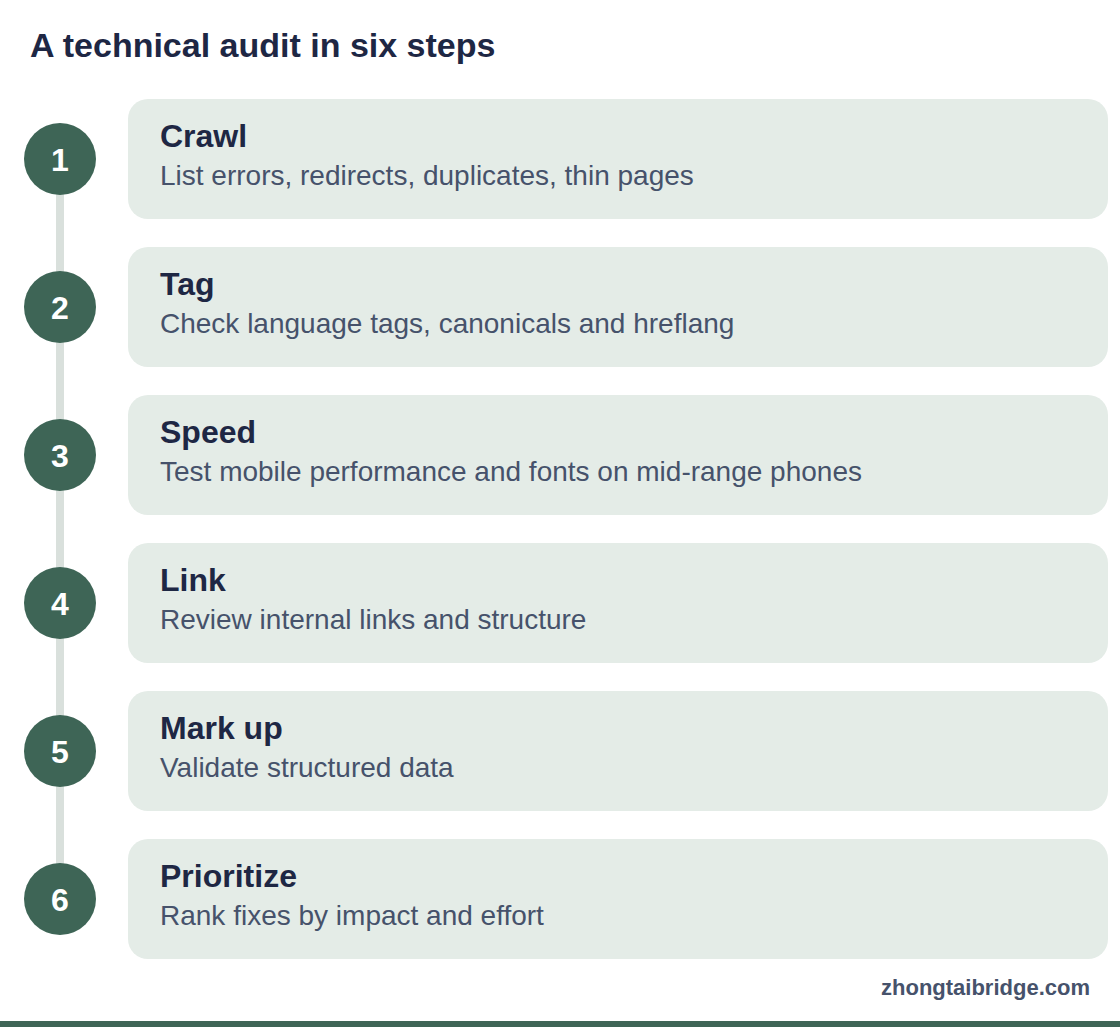
Crawl the site and list errors, redirects and duplicates.
Check language tags, canonicals and hreflang.
Test mobile speed and fonts on mid-range devices.
Review internal links and site structure.
Validate structured data.
Prioritize fixes by impact and effort.
A technical audit in six steps
Process diagram. 1. Crawl: List errors, redirects, duplicates, thin pages. 2. Tag: Check language tags, canonicals and hreflang. 3. Speed: Test mobile performance and fonts on mid-range phones. 4. Link: Review internal links and structure. 5. Mark up: Validate structured data. 6. Prioritize: Rank fixes by impact and effort.
A pre-launch checklist
Run the site on a mid-range phone on a mobile connection.
Check that Thai text renders correctly and that headings wrap sensibly.
Test forms and chat links.
Validate structured data and sitemaps.
Confirm robots rules and canonical tags.
Set up Search Console and analytics, and record a baseline.
Common technical errors on Thai sites
Missing or incorrect language tags.
Pages in Thai with English metadata, or the reverse.
Large unoptimized hero images and heavy fonts.
Duplicate pages created by tracking parameters.
Blocked CSS or JavaScript files in robots rules.
Broken hreflang links between language versions.
A triage list for slow Thai pages
Slow pages usually have a short list of causes. Large hero images served at desktop resolution to phones are the most common, followed by multiple web fonts with many weights, then third-party scripts for chat, tracking and widgets. Thai font files can be heavy, so subset them to the characters you need, load only the weights you use and set a system fallback so text appears immediately. Lazy-load below-the-fold images, compress to modern formats, defer scripts that are not needed for the first screen and use a content delivery network with good reach in Thailand. Measure Core Web Vitals on real devices, fix the heaviest templates first and re-test, because one template often affects hundreds of pages. Keep a before-and-after log so that stakeholders see the effect of each fix.
A worked example: a Thai section that never got indexed
The example is illustrative. A company launches a Thai section, but impressions stay near zero. The audit finds three issues: the Thai pages carry a noindex tag left from staging, hreflang tags point to the wrong URLs and a script blocks the Thai font on first load, making pages slow on mobile. The team removes the tag, corrects hreflang, subsets the font and compresses images. It submits the sitemap and requests indexing for key pages. Within weeks, Search Console shows indexed pages and first impressions for brand and category queries.
The point is that technical errors can hide good content. Before investing in more articles, check that pages can be found, rendered and read quickly on a phone.
Monitoring technical health over time
Check Search Console coverage and Core Web Vitals reports monthly.
Re-crawl the site after major releases.
Monitor structured data errors and fix them promptly.
Track redirects and broken links, especially after URL changes.
Keep a changelog of technical updates linked to traffic changes.
Executive questions on technical SEO
Is technical SEO worth the cost before we publish content? Yes, if the site cannot be crawled, rendered or loaded quickly on mobile, content investment is wasted. A short audit prevents that.
Who should own technical SEO? A developer or technical SEO specialist with authority to change templates, supported by a content owner.
How do we choose between a folder, subdomain or country domain? Use a language folder if you want to consolidate authority, a subdomain if you need separate systems and a country domain if local presence matters and you can maintain it.
What is a reasonable performance goal? Pass Core Web Vitals thresholds on mobile for your main templates and keep them stable as you add features.
Frequently asked questions
Do I need a separate domain for Thailand?
Not necessarily. A language folder or subdomain can work if tagged correctly. Choose based on your resources and strategy.
Does Thai text affect page speed?
It can, mostly through font files. Optimize fonts and test on mobile.
A complete Thai SEO guide: Google's 99.5% share, Thai keyword research, site architecture, content, technical checks, local signals, AI search and a 90-day roadmap.
A step-by-step Thai keyword research method: seed terms, segmentation, transliteration, intent mapping, marketplace suggestions, templates and a worked example.
A practical GEO guide for Thailand: AI adoption data, how assistants choose sources, answer-first pages, entity signals, prompt testing and a 90-day plan.